LLMs and models
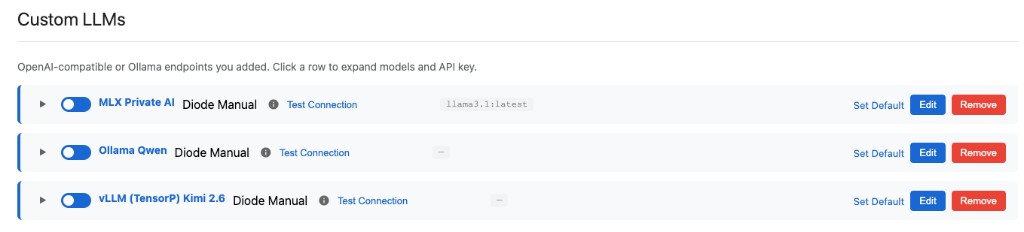
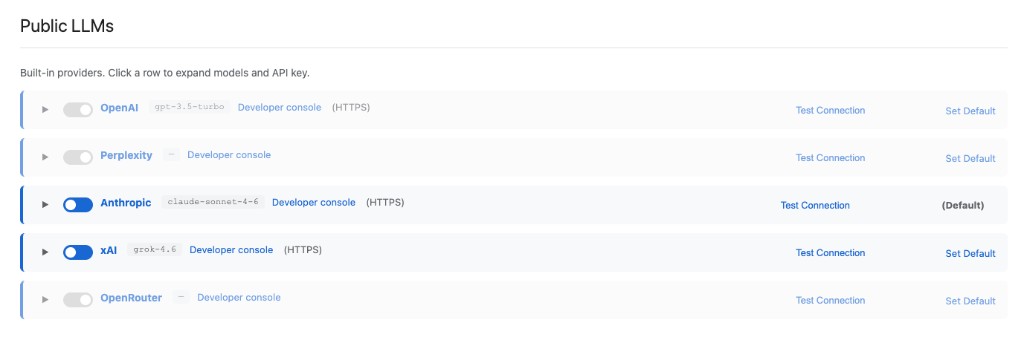
Nexus supports a variety of models based on your policy settings. You can configure any Private LLM, and Nexus also has built-in support for OpenAI, Anthropic, xAI, OpenRouter, and Perplexity. You configure how private and public models are routed, so usage stays secure and tailored to your environment.
Private AI models — private OpenAI-compatible or Ollama endpoints (self-hosted or partner-hosted), tunneled over Diode:
Public LLMs — built-in OpenAI, Anthropic, xAI, OpenRouter, and Perplexity:
Catalog at a glance
| Category | What it is |
|---|---|
| Private AI models | Any OpenAI-compatible or Ollama endpoint you or a partner operate (self-hosted or partner-hosted) |
| Built-in public LLMs | OpenAI, Anthropic, xAI, OpenRouter, and Perplexity |
Routing
- Under Settings → LLMs, enable or disable providers and drag to rank them; the first enabled provider is the default
- That ranking is how private and public models are routed for your policy
- Prefer Diode connection modes (Auto Discovery or manual bind) so the model hop stays on your private path
- Combine with Tools and MCP so the model can use organization data
- When a tool declares an LLM scope, Nexus routes only to policy-allowed models — not merely the workspace default
- In Perimeter Managed mode, Auto Discovery finds Private AI endpoints IT published on the ZTNA perimeter
Private endpoint setup: Private AI models.
Setup: Configure an LLM.