Private AI models
Private AI models are the center of Nexus: plug in self-hosted or partner-hosted Private AI, then wrap it in an organizationally aware package — tools, channels, ranking, and Diode connectivity — so the model your policy allows can actually work on confidential data. Nexus tunnels into your private model so it is never exposed to the public Internet.
Private AI models — OpenAI-compatible or Ollama endpoints you or a partner host, reached over Diode:
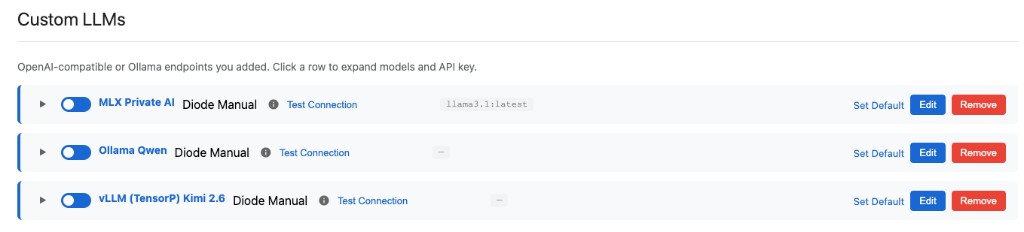
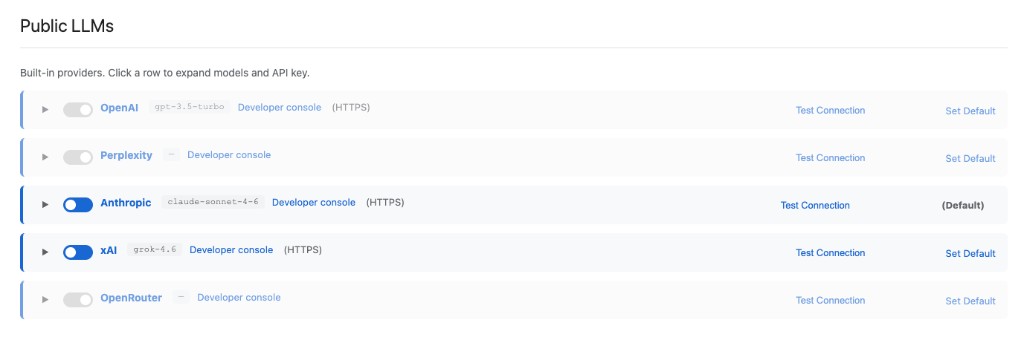
Nexus also has built-in public models (OpenAI, Anthropic, xAI, OpenRouter, and Perplexity); you choose how private and public models are routed. Catalog: LLMs and models.
Public LLMs — built-in providers, enabled and ranked under the same Settings → LLMs policy:
What “Private AI” means here
| Source | Examples | Where it shows up |
|---|---|---|
| Self-hosted | Ollama, vLLM, other OpenAI-compatible APIs in your VPC, plant, or region | Settings → LLMs → Custom LLMs |
| Partner-hosted Private AI | A managed private endpoint your MSP or AI partner operates for you | Same Custom LLMs path — OpenAI-compatible URL + credentials |
| Built-in public LLMs | OpenAI, Anthropic, xAI, OpenRouter, and Perplexity | Settings → LLMs → Public LLMs — route them with private models under your policy |
You are not locked into Diode’s default hub models. You bring the inference your security and compliance teams will accept.
Organizationally aware package
A private endpoint alone is not enough. Nexus turns it into a package:
- Model path over Diode — Prefer Auto Discovery (Perimeter Managed) or manual Diode binds so traffic stays on your ZTNA / private path (Diode security).
- Tools / MCP — Connect organization systems so the agent can fetch and act on real data (Tools and MCP).
- Routing — Rank and enable providers so private and public models follow your policy. Tools can tighten that further with policy-driven LLM routing.
- Channels & ACP — Same package answers Diode Collab, web embed, and apps such as Diode Vibe that point at your Nexus.
That is organization-aware AI: policy-driven generation grounded in your systems, not a shared public chatbot.
How to set it up
- Open Settings → LLMs.
- Under Custom LLMs, add your OpenAI-compatible or Ollama endpoint (self-hosted or partner).
- Set API key / test connection; choose default model.
- Rank and enable providers so private and public models route the way your policy requires.
- Enable the MCP tools your org needs so chat can use them.
Full checklist: Configure an LLM. Catalog notes: LLMs and models.